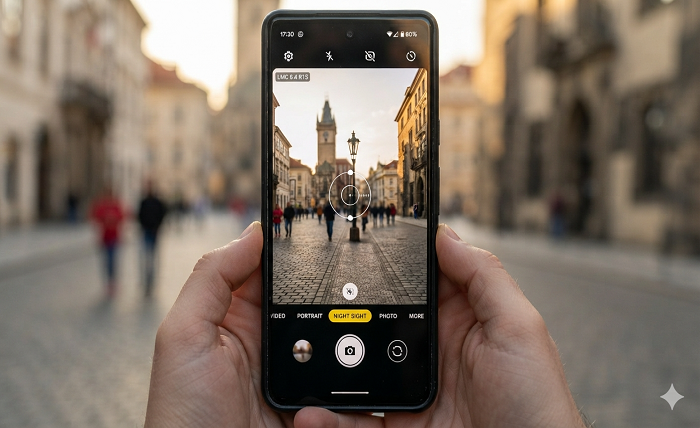
Smartphone photography has improved significantly in recent years, but the quality of a phone camera is not determined by hardware alone. Image processing, HDR performance, low-light optimization, and manual controls can make a major difference. This is where LMC 8.4 has attracted attention among Android photography enthusiasts.
LMC 8.4 is a modified Google Camera-based application designed to provide advanced photography controls and image-processing features on compatible Android smartphones. It is particularly popular among users who want more control over their phone’s camera without relying entirely on the default camera application.
For users interested in learning more about the app, LMC 8.4 Download provides information about the application, its features, configurations, and installation.
What Is LMC 8.4?
LMC 8.4 is a GCam-based camera modification associated with the developer Hasli. It builds upon Google’s computational photography approach and adds additional settings, controls, and customization options.
Unlike many basic camera applications, LMC 8.4 is aimed at users who want to fine-tune their photography experience. Depending on the device and configuration being used, the app can provide features such as HDR+, Night Sight, Portrait Mode, manual controls, RAW photography, multiple-lens support, and astrophotography.
One of the reasons the application has become popular is its ability to offer advanced controls on compatible Android phones. However, performance and available features can vary considerably between smartphone models.
Why Are Android Users Interested in LMC 8.4?
The default camera app on an Android phone is generally optimized for simplicity. It automatically selects exposure, focus, white balance, and other settings, which is convenient for everyday photography.
However, experienced photographers may want greater control.
LMC 8.4 gives users an opportunity to experiment with settings that are not always available in a manufacturer’s stock camera application. Instead of relying exclusively on automatic processing, users can adjust different parameters according to the scene.
This can be especially useful when photographing:
- Landscapes
- Portraits
- Night scenes
- Buildings and architecture
- Food
- Stars and the night sky
- Indoor subjects
- Moving objects
The result depends on the phone’s camera hardware, Android version, and the configuration used with the application.
Key Features of LMC 8.4
HDR+ Enhanced Photography
HDR+ is one of the most recognized features associated with GCam-based applications. It combines multiple exposures to produce an image with improved detail across bright and dark areas.
This can be useful in challenging lighting conditions, such as a person standing against a bright sky or a landscape containing both shadows and sunlight.
With the right configuration, LMC 8.4 can help produce photographs with balanced highlights, better shadow detail, and reduced noise.
Night Sight
Low-light photography is another area where computational photography can make a noticeable difference.
Night Sight captures multiple frames and processes them to create a brighter and more detailed photograph. Instead of simply increasing brightness, computational processing can help control noise and preserve details.
For the best results, users should keep the smartphone stable while taking night photographs. A tripod or stable surface can be particularly useful for darker scenes.
Portrait Mode
Portrait photography is popular for social media, profiles, family photographs, and casual photography.
LMC 8.4’s portrait functionality can separate the foreground subject from the background and create a depth-style blur. The quality of the effect depends on the phone’s cameras and software configuration.
For natural-looking results, good lighting and a clear separation between the subject and background can make a significant difference.
Manual Camera Controls
One of the most useful aspects of https://lmc84download.com/ for photography enthusiasts is its manual control options.
Depending on the device and configuration, users may be able to adjust settings such as:
- ISO
- Shutter speed
- Focus
- White balance
- Exposure
- Lens selection
Manual controls allow photographers to experiment with different techniques. For example, a slower shutter speed can be useful for certain night scenes, while manual focus can help when photographing subjects at a specific distance.
RAW Photography
RAW files preserve considerably more image information than standard compressed photographs. This makes them useful for photographers who want to perform detailed editing later.
A RAW image can provide greater flexibility when adjusting exposure, shadows, highlights, and color during post-processing. However, RAW files are usually larger than standard JPEG images and may require compatible editing software.
Multiple Lens Support
Modern Android smartphones often include multiple cameras, such as standard, ultrawide, telephoto, or macro lenses.
On compatible devices, LMC 8.4 can provide access to multiple lenses. This allows users to change perspectives depending on the scene.
An ultrawide lens can be useful for landscapes and architecture, while a telephoto lens may be better suited to distant subjects.
Astrophotography
Astrophotography is one of the more advanced uses of computational photography.
LMC 8.4 configurations that support astrophotography can help users capture stars and night-sky scenes with longer exposures and image processing. For better results, the smartphone should remain completely stable.
A tripod, dark environment, and clear sky are ideal conditions for experimenting with astrophotography.
Custom XML Configurations
XML configurations are an important part of the LMC 8.4 experience.
Different Android phones have different camera sensors, processors, lenses, and software characteristics. As a result, one configuration may work well on one device but produce poor results on another.
Custom XML files allow users to load predefined camera settings. Instead of manually adjusting dozens of options, users can apply a configuration designed for a particular smartphone or photography style.
This can make the setup process easier, especially for beginners.
LMC 8.4 and Smartphone Photography
The main attraction of LMC 8.4 is not simply the number of features. Its appeal comes from combining computational photography with customization.
A smartphone with good camera hardware can potentially benefit from better processing and carefully adjusted settings. However, users should remember that an APK cannot physically upgrade the camera sensor.
For example, if a phone has a basic camera sensor, installing a camera modification cannot turn that sensor into a flagship-level camera. Instead, the software can optimize how the available hardware is used.
This distinction is important when evaluating camera applications.
How to Get Better Results With LMC 8.4
Installing the application is only the beginning. Getting good photographs often requires experimentation.
First, choose a configuration appropriate for your smartphone. Then test the camera in different lighting conditions.
For daytime photography, users can experiment with HDR settings and color processing. For portraits, proper lighting and focus are important. At night, stability becomes especially important.
Users should also avoid changing too many advanced settings at once. Make one adjustment, take a few photographs, and compare the results. This makes it easier to understand which settings are actually improving image quality.
Compatibility and Performance
LMC 8.4 is designed for Android devices, but compatibility is not identical across all smartphones.
Factors such as the Android version, camera API support, processor, camera sensors, and available RAM can affect performance. Some phones may support most features, while others may experience limitations.
Possible problems can include:
- Camera crashes
- Features not working correctly
- Black screens
- Incorrect colors
- Lens switching problems
- Slow processing
- Configuration errors
Using a configuration designed for the specific phone can help reduce some compatibility problems.
Is LMC 8.4 Suitable for Beginners?
Yes, but beginners should start with the basic camera modes rather than immediately changing advanced settings.
The automatic modes can be used for everyday photographs, while manual controls can be explored gradually. Once users understand ISO, shutter speed, focus, and white balance, they can begin experimenting with more advanced photography techniques.
This makes LMC 8.4 suitable for both casual users and photography enthusiasts, provided their device is compatible.
LMC 8.4 vs. the Default Camera App
The stock camera application usually has one major advantage: it is specifically optimized by the phone manufacturer for that particular device.
LMC 8.4, on the other hand, focuses more heavily on customization and computational photography.
The default camera may be easier for quick snapshots, while LMC 8.4 can be more interesting for users who want to experiment with settings and image processing.
There is also no need to remove the stock camera application. Keeping both apps can be useful because different applications may perform better in different situations.
Safety and Download Considerations
Because LMC 8.4 is distributed as an APK rather than through the standard Google Play installation process, users should pay attention to the source of the file.
Downloading APK files from unfamiliar websites can expose a device to unnecessary security risks. Users should verify the source, check the file before installation, and avoid suspicious modified packages.
It is also important to remember that compatibility varies between devices. Before installing a camera modification, users should check whether their smartphone supports the required camera functionality.
Common Problems With LMC 8.4
Some users may experience crashes or unexpected behavior after installation. This does not necessarily mean that the application is defective. Camera modifications depend heavily on the device configuration.
If the application crashes, users can try closing background applications, restarting the phone, or switching to an appropriate XML configuration.
If a particular feature does not work, it may simply be unsupported by the phone’s camera hardware or Android software.
Keeping the manufacturer’s stock camera installed is also a sensible backup option.
Final Thoughts
LMC 8.4 is an interesting option for Android users who want more flexibility from their smartphone camera. Its combination of HDR processing, Night Sight, Portrait Mode, manual controls, RAW support, multiple-lens options, astrophotography, and XML configurations gives photography enthusiasts plenty of room to experiment.
The most important factor is compatibility. Not every feature will work identically on every Android smartphone, and users may need to experiment with configurations to find the best results.
For people who enjoy smartphone photography and want to explore features beyond their standard camera application, LMC 8.4 can be a useful tool to consider. With the right device, configuration, and shooting technique, it can provide a more customizable photography experience while allowing users to make better use of the camera hardware they already own.